What are browser fingerprints and how do they work

Do you regularly change your IP address and cookies, but the website still recognizes you? It seems you've left your fingerprints behind — and not from your fingers, but from your browser. A browser fingerprint is one of the key concepts in matters of privacy, tracking, and ad personalization; systems use it to recognize a user. Let's figure out the details of what browser fingerprints are, how they are collected, how you can hide your fingerprint, and what tools can be used to check it.
How Browser Fingerprints Work: Explaining the Technical Part
A browser fingerprint is a unique set of technical characteristics inherent to a specific user's device. Neither a VPN nor other anonymization tools can hide them: many parameters are unique and characteristic of only one device. To explore the issue in more detail, let's break down the fingerprint collection process step by step.
Collecting User Information
So, first of all, you visit a certain website — at this moment, your device transmits a mass of data about itself to the resource:
-
User Agent (UA)
This identification text string, which your browser sends to the site, is a kind of attempt to "introduce itself" upon first meeting. It includes the browser itself and its version, the operating system, the device, and its architecture. Today, UA is used less for fingerprinting because it is not unique. For example, hundreds of millions of real devices on Windows using Chrome version 144 will have the same UA:
Mozilla/5.0 (Windows NT 10.0; Win64; x64) AppleWebKit/537.36 (KHTML, like Gecko) Chrome/144.0.0.0 Safari/537.36 -
HTTP Headers
These are lines of text in "key: value" format exchanged between the browser and the server with each request. For example, Accept-Language is a request regarding the languages used on the client's device.
-
JavaScript API
This is a software interface initially built into the browser, and it reveals dozens of system parameters to the site. It collects information about the display, time zone, language, amount of RAM, battery status, installed plugins, and extensions on the device the visitor is using.
-
Installed Fonts
These provide specifics on the OS being used and its version, detected via the JavaScript API.
-
Hardware (CPU, GPU)
Through JS, the number of threads (cores) is collected into the fingerprint. In general, the main information about the GPU comes through WebGL or its newer analog, WebGPU.
Perhaps the main source of information about the user is the JavaScript API, but together with other data, it further increases the probability of determining a unique data set that no one else on the internet has.
Hashing and Identification Algorithms
The browser transmits a huge array of diverse data to the site's server, which is impossible to work with in its raw form. At this moment, hashing algorithms come into play: the data is brought to a uniform format, sorted, and filtered. The output is a string in a template that is convenient to use for working with all fingerprints, but the process does not end there.
The resulting string is passed through a cryptographic hash function and acquires a specific appearance depending on the hashing format, for example, via MD5:
a1b2c3d4e5f6g7h8i9j0k1l2m3n4o5p6
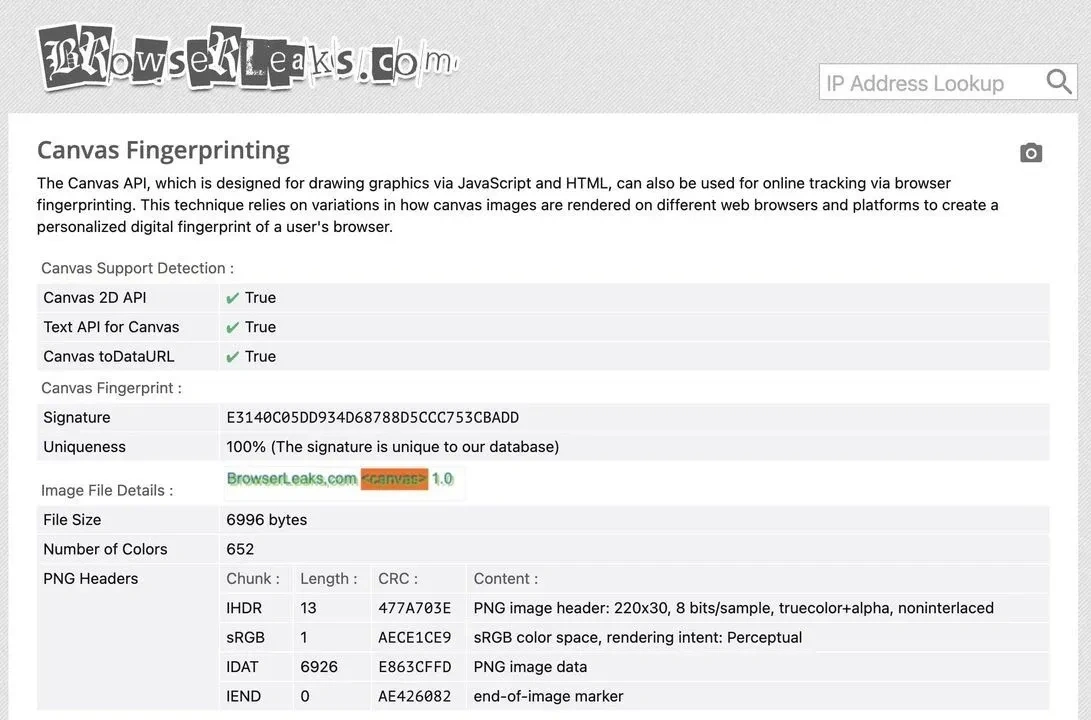
Now the information about the client's digital browser fingerprint is hashed and fully ready for storage and further use. You can see it in a similar form on browser fingerprint checker sites — don't be surprised: they also use hashing.
Storage and Use of Fingerprints
Sites use client browser fingerprints for a wide variety of purposes:
- Personalizing content for a specific person.
- Setting up targeted advertising taking into account user interests.
- Preventing fraud and any untrustworthy behavior.
Moreover, sites subsequently exchange browser fingerprints with each other through advertising networks and trackers. Thus, for example, you can visit one site and see personalized advertising on a second one — all because both are tied to the Facebook pixel, which initially determined your fingerprint, saved it in its database, and used it as soon as it recognized you again.
Hashed fingerprints are usually stored in the server's database, while on the client side, there is a link to a Cookie. In any case, the web resource has now remembered and will be able to successfully identify you on your next visit.
How to Hide Fingerprints
Among the popular but ineffective ways to hide browser fingerprints, we can highlight:
- Using VPN and Tor — these anonymization tools do not cover the entire set of data that makes up a browser fingerprint, so they will not handle the task completely.
- Disabling JavaScript — this will negatively affect the site's functionality, and you will not be able to use all its features.
- Clearing cache and cookies — the data will be deleted, but the browser fingerprint will remain the same, and the system will still recognize you.
A possible option for hiding fingerprints is the use of special browser extensions. They will significantly reduce browser performance and will not cover all necessary parameters, but sometimes this approach works. However, what will definitely allow you to hide fingerprints are anti-detect browsers: they completely substitute all digital data about the user and provide a new digital identity, one that is unique and realistic.
How to Check Fingerprints
To see all the current parameters of your device, you can use a specialized service, of which there are dozens on the internet to choose from. Here are a couple of examples:
Conclusion
A browser fingerprint is a set of unique data characteristic of a specific user. Internet sites collect and use them for various purposes, from showing ads to blocking specific users. You can always check your fingerprint, and if necessary, hide it, and the most reliable solution for this task will be an anti-detect browser.
Frequently Asked Questions
From the perspective of advanced anti-bot systems, on mass-market configurations (especially macOS on M-chips or iOS), your "clean" browser fingerprint has low entropy and merges with thousands of identical devices into a single cluster, becoming unique only when rare extensions are installed or standard settings are changed, creating noticeable anomalies.
Some web resources do not track user data, but the share of those that do is growing every year. Ad networks and marketplaces almost universally track user fingerprints. And unlike cookies, obtaining a fingerprint does not require your consent, making it much harder to track. However, there are specialized extensions—such as Privacy Badger from the EFF—that allow you to track and block hidden data trackers.
In 2026, JavaScript is the primary tool for websites regarding interactivity, animation, and functionality. By disabling this technology, you will largely protect your browser fingerprint from tracking, but you will not be able to use most modern internet resources.
No. An encrypted tunnel between your device and the internet will spoof your IP address and encrypt the traffic flow, but it will not change the vast majority of device parameters, and it will still be recognized.
This dataset is not static: for example, a browser update can change the User Agent and Canvas rendering. Moreover, you can simply change the device font or connect a second monitor—and your data is already changed. But creating a new fingerprint from scratch this way is irrational: you can't keep up with every aspect, and some old characteristics will likely remain anyway, so it is better to entrust the protection of your digital anonymity to an anti-detect browser.