7 Free Antidetect Browsers — Download and Use

In 2026, an anti-detect browser is a basic tool for working with multi-accounting, traffic arbitrage, web scraping, and bonus hunting. Platforms have strengthened their anti-fraud systems, and a single proxy is no longer enough — a correct digital fingerprint, profile isolation, and other technical parameters are essential. It is not surprising that the query "free anti-detect" remains one of the most popular — especially among those just starting out in the niche.
In this article, we will analyze which free anti-detect browsers are available in 2026, how free tariffs differ from completely free solutions, and in which cases it is worth switching to a paid version.
7 Free Anti-Detect Browsers
Completely free and simultaneously reliable anti-detects do not exist. In 2026, the accuracy of the fingerprint, the frequency of core updates, and resistance to anti-fraud systems require constant development. Therefore, the most reasonable way to get a high-quality tool without investment is to use basic or trial versions of proven services.
Linken Sphere
Linken Sphere is a professional Chromium-based anti-detect browser focused on stable work with multi-accounting, traffic arbitrage, and advertising cabinets. The service relies on realistic digital fingerprints and reliable profile isolation, which is especially important when working with modern anti-fraud systems. The core is updated regularly and promptly: for example, the update for Chrome 144 was released 3 days after the official Google update.
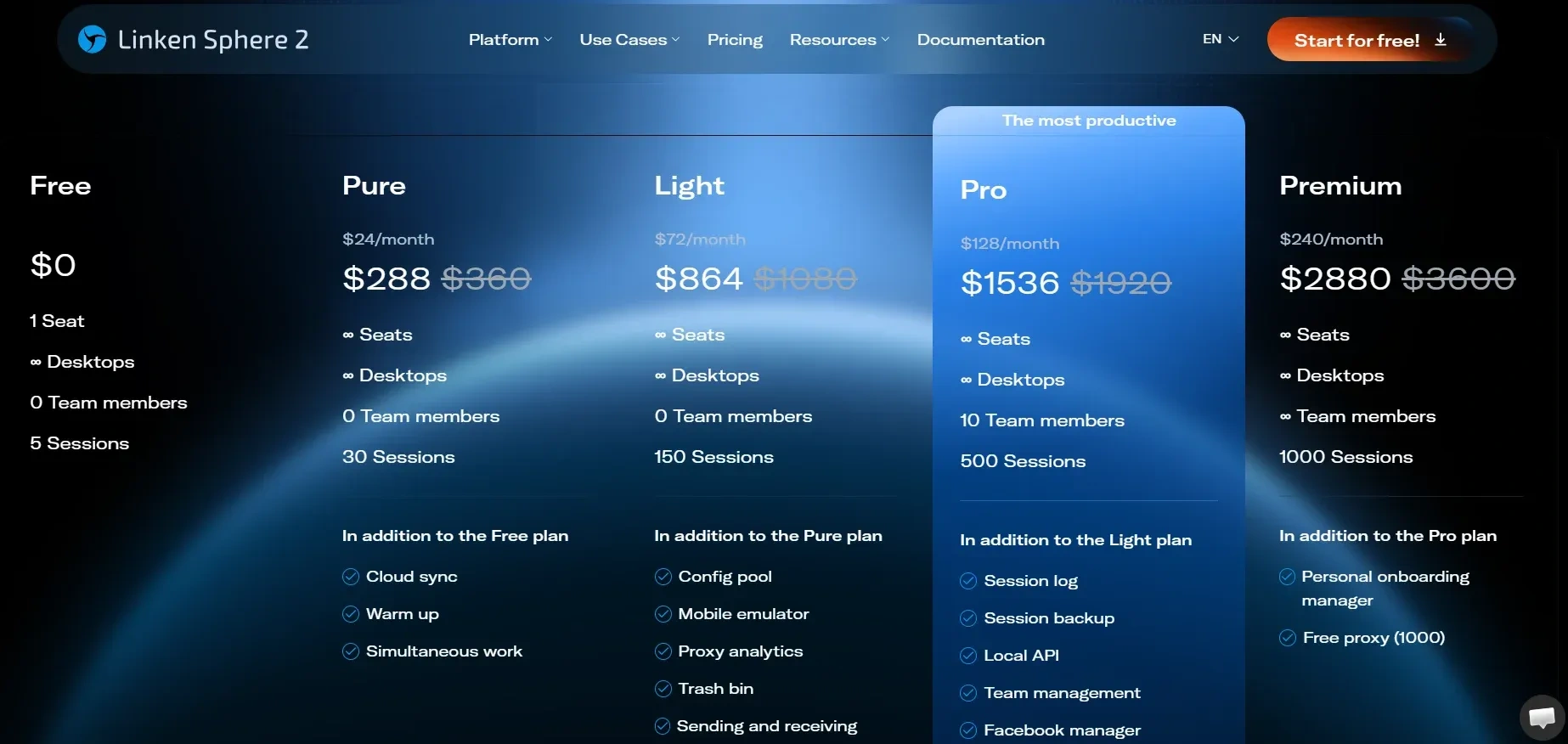
Key features of the free Linken Sphere plan:
- 5 profiles for free and without time limits — you can work calmly without haste and hidden restrictions
- Flexible fingerprint configuration — management of browser parameters: user agent, WebGL, Canvas, language, time zone, screen resolution, plugins, and other device characteristics
- Proxy support — the ability to connect a separate proxy to each profile with complete session isolation
- Account isolation — profiles do not overlap with each other in terms of cookies, cache, and system parameters
- Mass operations — import of cookies, accounts, and proxies for quick launch and scaling
- Support for different device types — creation of environments for desktop and mobile devices
- Automation and API — tools for integration with external services and workflow automation
If the task is to minimize the risks of bans while not investing at the start, Sphere looks like the most balanced option among solutions with free access.
AdsPower
AdsPower is a popular Chromium-based anti-detect browser widely used in e-commerce, traffic arbitrage, and marketplace work. It is a relatively inexpensive product from Chinese developers. Support for the current version of Chrome is released with a noticeable delay compared to market leaders, but within a working update cycle.
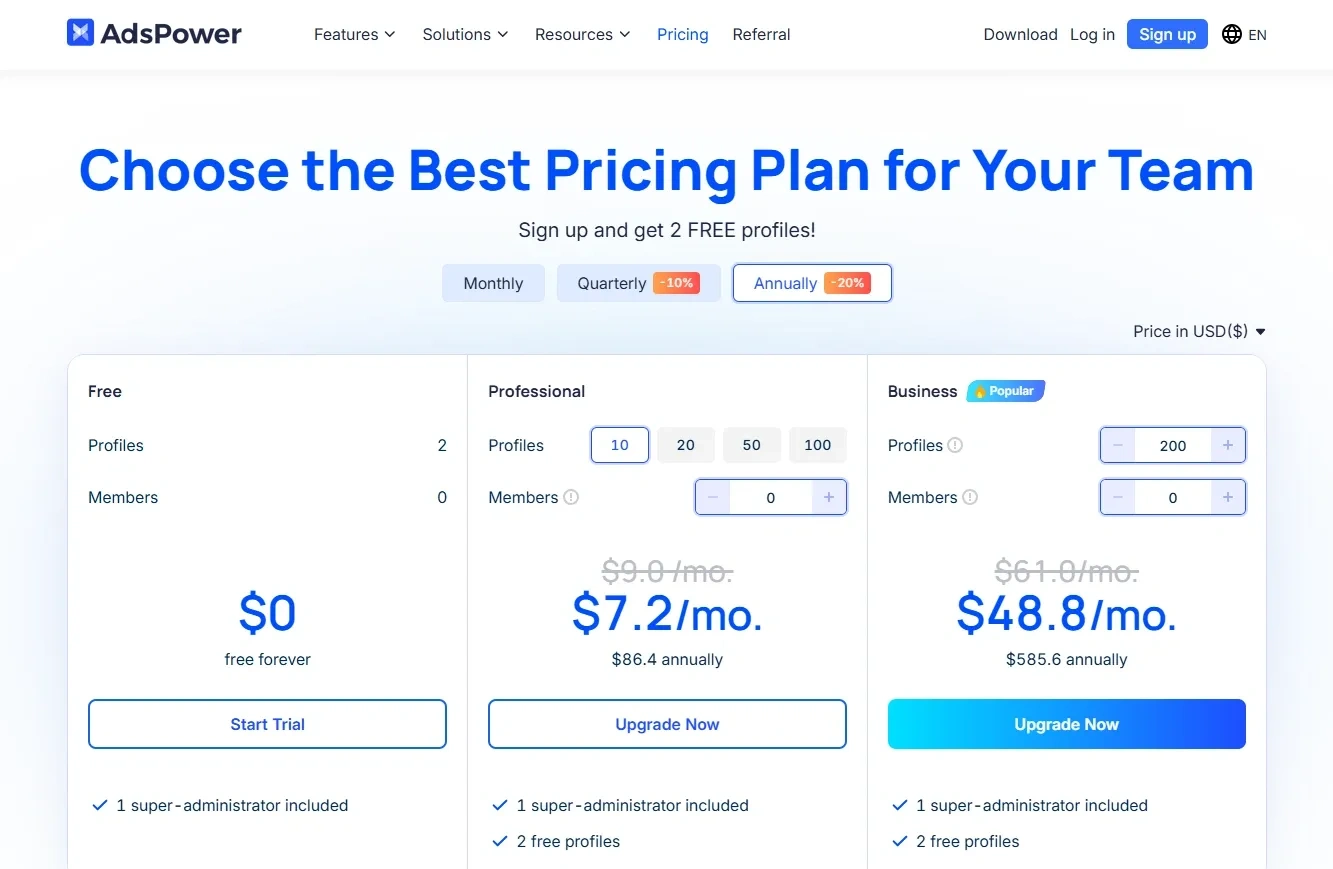
Key features of the AdsPower trial version:
- 2 profiles for free — the basic plan allows you to create only two working profiles
- Flexible fingerprint configuration — management of browser parameters, including user agent, Canvas, WebGL, language, time zone, and other characteristics
- Proxy support — connection of individual proxies to each profile
- Automation — built-in tools for task automation and integrations
- Cloud synchronization — storage and management of profiles via cloud infrastructure
In January 2025, AdsPower experienced a hack: malicious code was distributed through a third-party extension update. As a result, some users faced compromised crypto wallets and loss of funds. The problem was fixed, and the service released recommendations for account protection. The incident was a one-off, but when working with budgets, the security factor should be taken into account.
MoreLogin
MoreLogin is another Asian Chromium-based anti-detect browser focused on e-commerce, marketplaces, social networks, and working with advertising accounts. In 2025, the service actively began introducing new functions, but basic core updates are released irregularly.
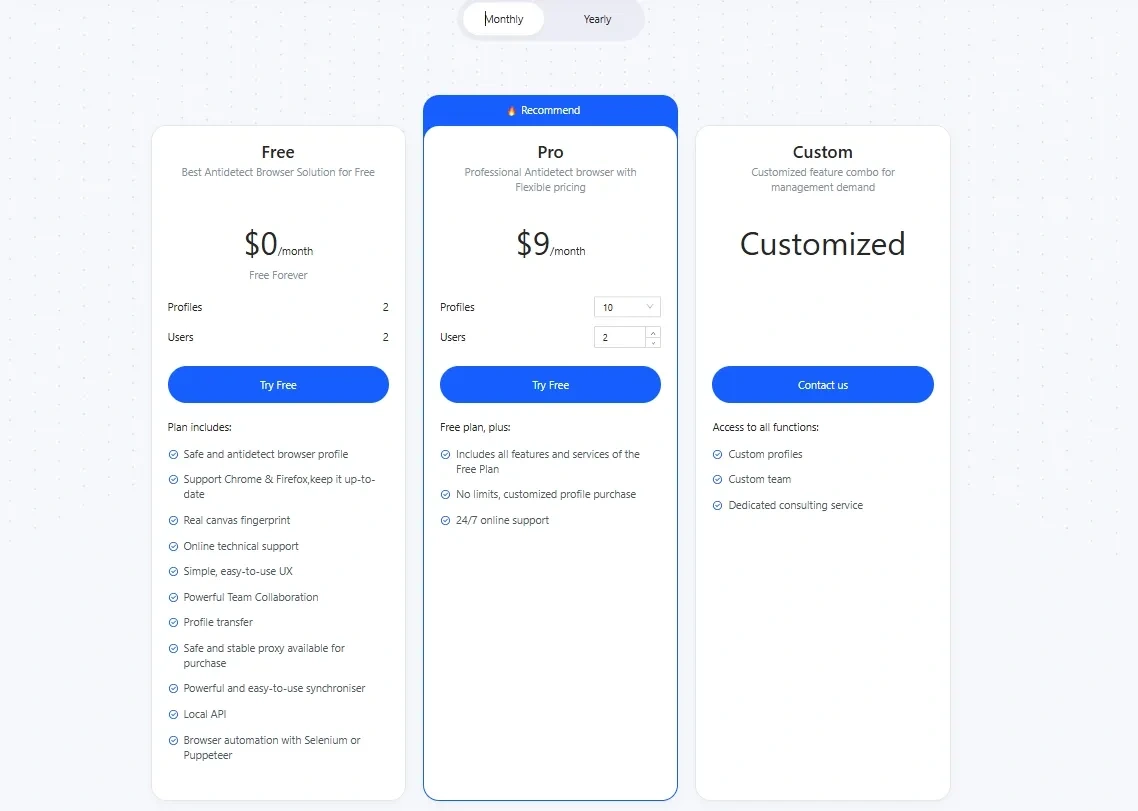
Key features of the free MoreLogin plan:
- 2 profiles for free — basic access allows creating two working profiles
- Isolated profiles — each profile launches as a separate environment with its own digital fingerprint (user agent, WebGL, Canvas, language, time zone, and other parameters do not overlap)
- Basic fingerprint configuration — modification of key browser parameters is available without deep customization
- Proxy support — connection of HTTP and SOCKS proxies to each profile
- Cloud profile storage — access to profiles from different devices after authorization
The free plan is suitable for testing the service and working with a small number of accounts. Scaling will require upgrading to a paid plan.
Incogniton
Incogniton is an anti-detect browser from European developers, originally oriented towards e-commerce. Releases come out with delays and irregularly.
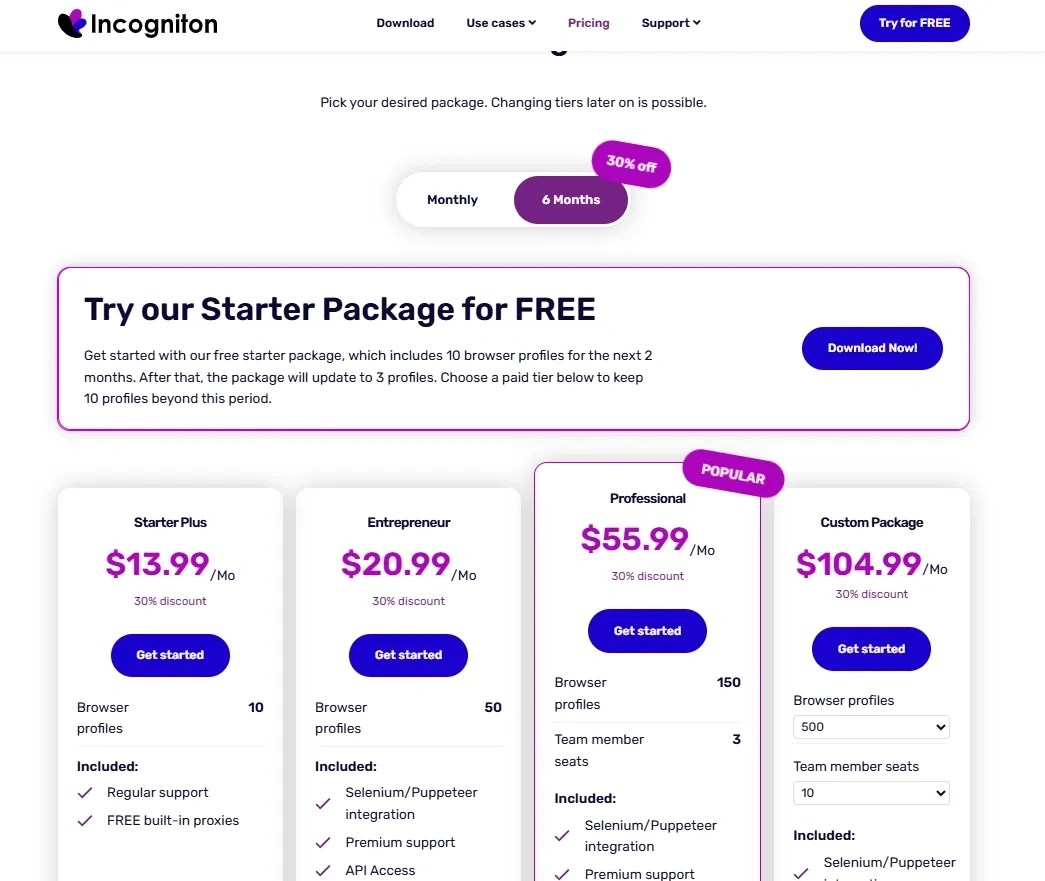
Key features of the free Incogniton plan:
- 10 profiles for free at the start — extended access is provided only for a limited period (2 months), after which the conditions change
- Browser parameter configuration — management of user agent, language, time zone, and other environment characteristics
- Proxy support — connection of separate proxies to each profile
An additional limitation should be considered: if the user has logged in and then closed the browser, re-entry is possible only 30 minutes after the last authorization.
Switch Antidetect (myBOT)
Switch Antidetect is an anti-detect browser from the myBOT project, positioned as an affordable solution for multi-accounting and bypassing basic anti-fraud checks. However, unlike proven solutions, there are practically no real reviews, feedback, or independent tests of Switch, and its technical documentation and reputation raise questions among experts. Timely support for Chrome updates is not implemented.
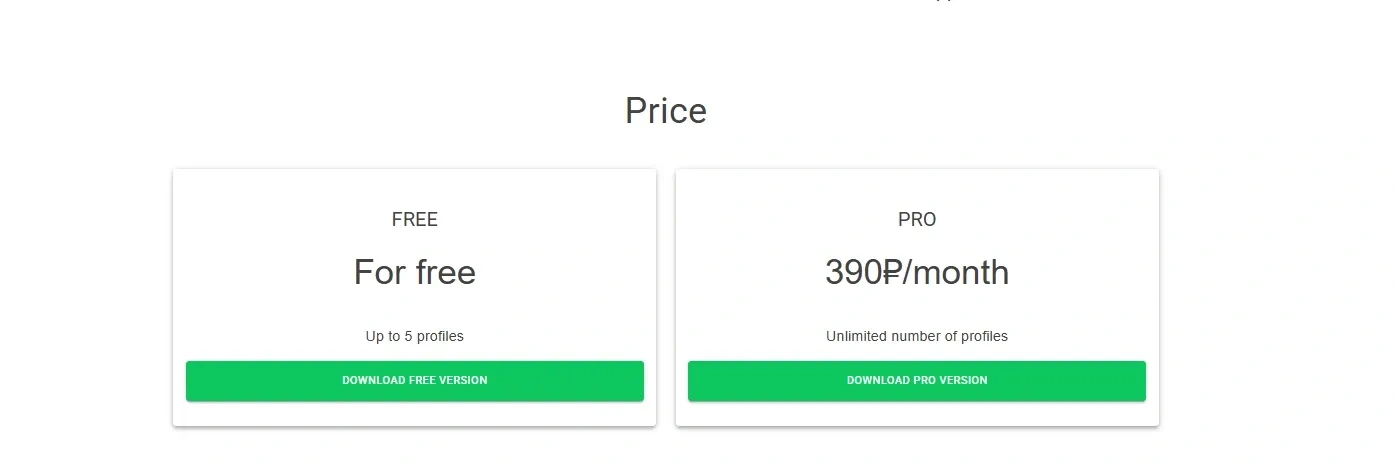
Key features of the free Switch Antidetect browser:
- free plan with 5 profiles — access is available, but without clear guarantees of quality or stability
- works only on Windows — for other systems, emulators or virtual machines will have to be used
- claimed fingerprint spoofing — promises to mask browser parameters, but objective results from independent tests are missing
- minimum technical documentation — there are almost no descriptions of algorithms, updates, or detailed capabilities on the official website or in open sources.
We do not recommend using this browser for working with advertising cabinets. At most — for surfing the internet and spoofing location to bypass regional restrictions.
Undetectable
Undetectable is an anti-detect browser promoted as a solution for multi-accounting and bypassing anti-fraud. The core is updated quite promptly: within 7–10 days relative to the official release date.
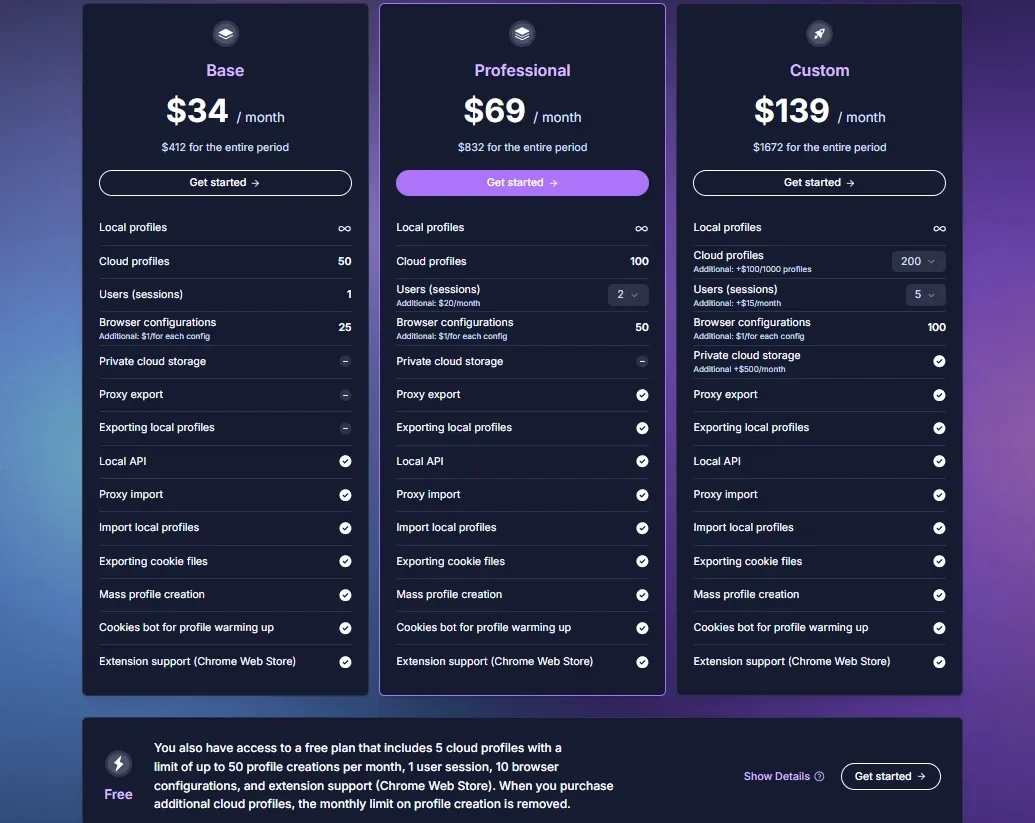
Key features of the free trial of the Undetectable browser:
- Creation of separate profiles — allows running multiple accounts through different sessions, but the management system is extremely inconvenient
- Basic browser parameter spoofing — changing user agent, language, time zone, and some device characteristics. There is no deep fingerprint configuration
- Proxy support — support for connecting HTTP and SOCKS proxies, but stability depends on the version and build
- Local data storage — profiles are saved on the user's device without cloud synchronization
- Minimal interface — functionality is limited, there are no additional tools for automation or teamwork
- Lack of a developed ecosystem — no API, profile synchronizer, or advanced scaling tools
Functionality is limited to basic tools without advanced settings and additional modules. For simple tasks (bypassing regional blocks), this may be enough, but when working with advertising cabinets, it is important to consider the level of protection and stability.
Dolphin Anty
Dolphin Anty is a popular Chromium-based anti-detect browser actively used in arbitrage, SMM, and e-commerce. Updates for Chrome are released regularly.
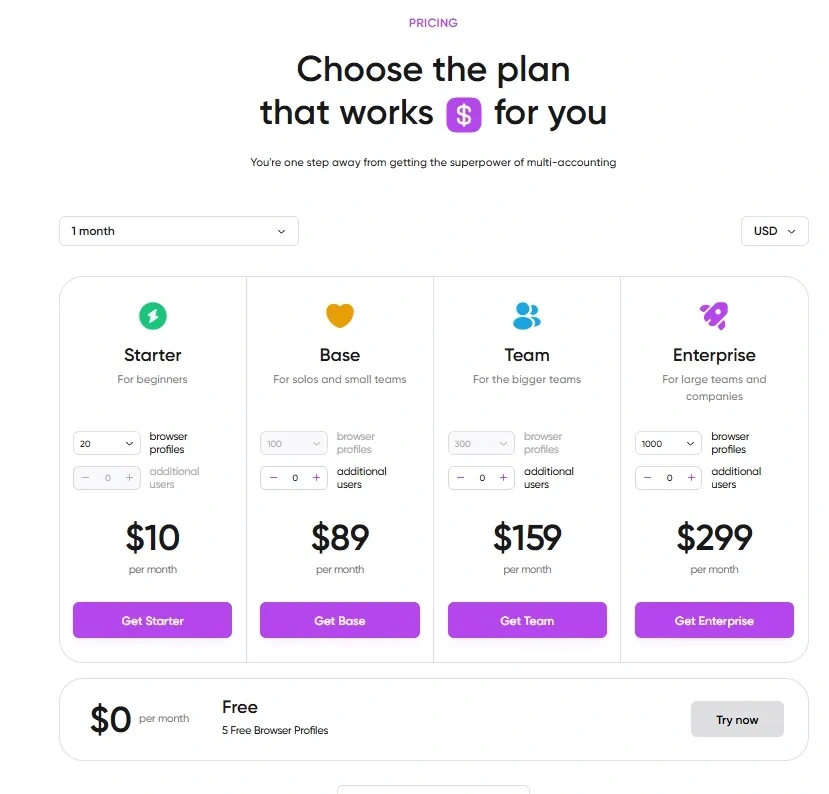
Key features of the free Dolphin Anty trial:
- 5 profiles for testing — since last year, the number of free profiles has been cut in half
- Isolated profiles — each profile works as a separate browser with its own unique fingerprint: user agent, WebGL, language, time zone, and other parameters do not overlap between accounts
- Proxy integration — support for various types of proxies for each profile
- Profile synchronizer — allows duplicating actions from one profile to several others simultaneously
- Cross-platform — works on Windows, macOS, and Linux.
Free access allows you to evaluate the functionality and stability of the service in real conditions before making a decision to switch to an extended plan.
Free vs Paid Anti-Detect
If we compare free anti-detect browsers with paid solutions (and freemium ones — special tariffs, trial versions), the differences are obvious. If a product has no paid version, no trial, and no clear monetization model, it means it lacks a sustainable financial base for development. And without constant investment, it is impossible to maintain core relevance, refine fingerprints, and react quickly to changes in anti-fraud systems.
Such solutions often use outdated Chromium builds, templated or poorly developed fingerprints, and lack a transparent update history and full-fledged technical support. The user is essentially left alone with possible failures, bans, or data leaks.
Therefore, if the task is limited to learning or testing without the risk of losing an account or budget, a free option may be suitable. But if we are talking about working with valuable accounts, saving on the tool almost always results in higher costs.
When to Consider a Paid Version
A paid anti-detect is justified in situations where:
- There are advertising budgets for Google Ads, Meta, TikTok — any cabinets with prepayment
- Accounts are expensive or farmed for a long time (marketplaces, payment systems, services with KYC, business pages)
- More profiles and high speed are needed (mass operations, import, templates, tags, teams)
- Stability is important: fewer checkpoints, predictable fingerprint behavior, fast core updates
- Automation is needed (API, integrations, scripts)
An anti-detect is infrastructure. And like any infrastructure, it must be reliable. In serious work, compromising on quality almost always costs more than a subscription.
How to Check the Correct Operation of an Anti-Detect Browser
Step 1. Digital fingerprint check.
Open a profile and check it on specialized services: Browserleaks, Pixelscan, AmiUnique, Whoer.net. Pay attention to Canvas, WebGL, Audio fingerprint, fonts, language, and time zone parameters. If the IP is from one country, but the time zone and language are from another, the mismatch can become a trigger for the system.
Step 2. IP and leak check.
Check the profile via IP Leak, WebRTC Leak Test, and DNS leak test. You need to ensure that the real IP is not revealed via WebRTC, DNS requests go through the proxy, and an active IPv6 connection is not displayed when working via an IPv4 proxy.
Step 3. Profile isolation check.
Open two different profiles and log in to the same site — the data of one account should not be displayed in the second: there should be no auto-login, shared cookies, or overlapping cache and localStorage.
Step 4. Fingerprint stability check.
Close the profile and open it again, then check the fingerprint on the same services. Key parameters should not change without reason. A jumping fingerprint looks suspicious to anti-fraud systems.
Step 5. Check on real platforms.
The final stage is logging into real services: Google, Facebook, Instagram, advertising cabinets. If mass captchas, suspicious login warnings, or additional checks appear immediately, it means the profile is configured incorrectly or the anti-detect is working unstably.
Conclusion
In 2026, an anti-detect browser is the foundation of stable work with accounts and advertising. Free tariffs from major services are suitable for starting but have limitations, while completely free solutions without a clear development model always lag in quality and updates. As long as it's about testing and learning, free access is sufficient. But as soon as advertising budgets and valuable accounts appear, saving on the tool is no longer reasonable — the risks of bans and losses are higher than the cost of a subscription.
Frequently Asked Questions
For working with social networks (Facebook, Instagram, TikTok, X), it is better to choose solutions with a realistic fingerprint and high-quality profile isolation. It is important that the browser allows you to correctly configure the user agent, language, and time zone, as well as connect a separate proxy to each profile.
Yes, if we are talking about a free plan or a trial of a full-fledged service, and not a completely free browser. For example, Linken Sphere allows you to use 5 profiles for free without time limits. This is a full version with a working core and correct fingerprint spoofing. For a test launch of Google Ads, this limit is sufficient — you can create a separate profile for each account and connect an individual proxy.
It is important that the site sees only the proxy IP, not your real address. Sometimes a browser can reveal the real IP through WebRTC technology or DNS requests, even if a proxy is connected. Therefore, after creating a profile, you need to check it on IP analysis services and make sure that only the proxy address is displayed, and the IP country matches the profile's language and time zone. If the site sees different countries or a real IP, this increases the risk of checks and bans.
If, after restarting the profile, its digital fingerprint remains the same, the site sees only your proxy IP, accounts do not overlap via cookies and localStorage, and there are no constant captchas or suspicious activity warnings upon login — then the profile is configured correctly.
First of all, you should check the proxy — it is possible that the IP is already blacklisted. Then you need to make sure that the fingerprint does not change with each launch and there is no conflict between the IP country, language, and time zone. Frequent captchas and warnings most often appear due to low-quality proxies, an outdated core, or a poorly configured profile.